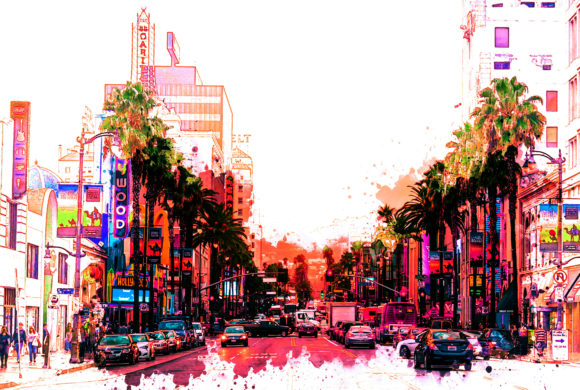
Color Cyber Punk: Transforming Photos with High-Impact Neon Aesthetics
In the evolving landscape of digital photography and graphic design, visual trends often cycle through periods of nostalgia and futurism. Currently, one of the most striking aesthetics dominating social media feeds, album covers, and advertising campaigns is the Cyberpunk style. Characterized by high-contrast lighting, neon glows, and a distinct blend of teal and magenta hues, this look evokes a futuristic, dystopian atmosphere that captures the imagination. However, achieving this complex color grading manually in post-production software can be time-consuming and technically demanding. This is where tools like the Color Cyber Punk Photoshop Action become invaluable assets for creators.
This article explores the functionality, benefits, and practical applications of the Color Cyber Punk action. We will examine how this automated tool streamlines the editing process, the technical requirements for optimal results, and how both amateur enthusiasts and professional designers can leverage it to enhance their visual storytelling.
Understanding the Appeal of the Cyberpunk Aesthetic
Before diving into the technical specifics of the software, it is essential to understand why the Cyberpunk look remains so popular. Originating from science fiction literature and cinema, the aesthetic is defined by its "high tech, low life" theme. Visually, this translates to images saturated with artificial light sources—neon signs, holographic displays, and street lamps reflecting off wet pavement. The color palette typically relies on complementary contrasts, most notably cyan and orange or pink and blue.
For photographers and digital artists, replicating this look manually involves intricate layer adjustments, curve manipulations, and selective color grading. It requires a deep understanding of light physics and color theory. The Color Cyber Punk action simplifies this workflow by automating these complex adjustments, allowing users to apply a professionally graded look with minimal effort. This democratization of advanced editing techniques enables creators to focus more on composition and subject matter rather than getting bogged down in technical minutiae.
How the Color Cyber Punk Action Works
The core value proposition of the Color Cyber Punk Photoshop Action is efficiency. Designed to save an immense amount of work per photo, this tool applies a pre-recorded series of commands to your image with just a couple of clicks. Instead of spending thirty minutes adjusting levels, adding glow effects, and tweaking saturation, the action performs these tasks in seconds.
Streamlined Workflow for Professionals
For professional photographers who handle large volumes of images, time is a critical resource. An action that can instantly apply a consistent style across a batch of photos ensures brand consistency and faster turnaround times for clients. Whether you are editing street photography taken at night or studio portraits that require a modern, edgy feel, the action provides a reliable baseline that can be further customized.
Accessibility for Beginners
For beginners, the learning curve of Adobe Photoshop can be steep. The Color Cyber Punk action serves as an educational tool as well as a practical one. By applying the action and then examining the resulting layers, novice users can learn how professional color grading is constructed. This "learn by doing" approach helps users understand the relationship between different adjustment layers and how they contribute to the final image.
Technical Requirements and Compatibility
To ensure the smooth operation of the Color Cyber Punk action, certain technical prerequisites must be met. Understanding these limitations beforehand prevents frustration and ensures the best possible outcome.
- Software Version: The action is compatible with Adobe Photoshop CS5 and later versions. This broad compatibility makes it accessible to users who may not have the latest subscription-based software.
- Language Restriction: A crucial detail to note is that the action is designed specifically for the English version of Photoshop. Currently, other language versions are not supported. This is because actions often rely on specific layer names and menu commands that vary across localized versions of the software. Users must ensure their Photoshop interface is set to English before installing and running the action.
- File Formats: The download package includes the action file (
.atn) and necessary brushes (.abr). It also comes with a help file in Notepad format for installation instructions.
Optimizing Input for Best Results
While the action is powerful, it is not a magic wand that can fix poor-quality source material. The quality of the output is directly dependent on the quality of the input. To get the best possible outcome from the Color Cyber Punk action, adhering to specific image recommendations is vital.
Resolution and DPI
It is highly recommended to use high-resolution images as input. The ideal specification is a resolution of 3000px x 3500px at 300 dpi. High-resolution files contain more data, allowing the action’s algorithms to apply gradients, glows, and color shifts smoothly without pixelation or banding. Low-resolution images may result in artifacts or a loss of detail when the heavy color grading is applied.
Lighting Conditions
Although the action adds artificial lighting effects, it works best on images that already have some degree of contrast and interesting light sources. Photos taken during the "blue hour" (just after sunset) or in urban environments with existing neon lights will yield the most authentic Cyberpunk results. Flatly lit images may require additional manual adjustments to create the depth necessary for the effect to shine.
Layer Organization and Customization
One of the standout features of the Color Cyber Punk action is its intelligent layer organization. Unlike some automated tools that flatten the image or create a chaotic stack of unnamed layers, this action keeps the workspace clean and structured.
Each element of the effect—such as color grading, glow effects, and contrast adjustments—is placed in its own folder or layer group. This organization allows for rapid customization. If the neon glow is too intense for a particular photo, you can simply lower the opacity of the glow layer. If the colors are too saturated, you can adjust the specific color balance layer. This flexibility ensures that the action serves as a starting point rather than a rigid final product, empowering users to tailor the effect to their specific artistic vision.
Real-World Applications and Use Cases
The versatility of the Color Cyber Punk action makes it suitable for a wide range of creative projects. Here are several scenarios where this tool can add significant value:
- Music Industry Artwork: Album covers and promotional materials for electronic, synthwave, or hip-hop artists often benefit from the edgy, futuristic vibe of Cyberpunk aesthetics.
- Social Media Content: Influencers and content creators looking to stand out on platforms like Instagram or TikTok can use this action to create a cohesive and eye-catching feed theme.
- Advertising Campaigns: Brands targeting younger demographics or promoting tech products can use this style to convey innovation and modernity.
- Personal Photography Projects: Hobbyists can experiment with transforming ordinary cityscapes into dramatic, cinematic scenes, enhancing their portfolio with a unique stylistic signature.
Evaluating Suitability for Your Needs
Before purchasing or downloading the Color Cyber Punk action, consider your specific needs. If you frequently edit night photography, urban landscapes, or portraits that require a bold, stylized look, this tool is an excellent investment. It reduces repetitive tasks and ensures consistency.
However, if your work primarily involves naturalistic landscape photography, soft portrait retouching, or corporate headshots, this aesthetic may not align with your goals. It is important to recognize that while the action is customizable, its core design is rooted in a specific, high-contrast visual language.
Additionally, keep in mind that preview images and mockups are not included in the download package. Users should rely on the provided help file and their own experimentation to master the tool. The absence of mockups means you will need to test the action on your own library of images to fully gauge its potential.
Conclusion
The Color Cyber Punk Photoshop Action represents a bridge between complex digital artistry and efficient workflow management. By automating the intricate process of cyberpunk-style color grading, it allows creators to produce high-impact visuals with speed and precision. While it requires the English version of Photoshop CS5 or higher and benefits greatly from high-resolution input, the trade-off is a significant reduction in editing time and a professionally organized layer structure.
Whether you are a seasoned designer looking to streamline your process or a beginner eager to explore advanced color theory, this action offers a practical solution. It empowers users to transform ordinary photos into extraordinary, neon-soaked narratives, proving that with the right tools, creating stunning digital art is accessible to all.