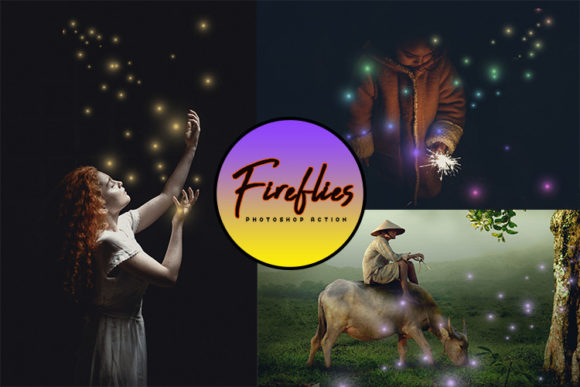
Transform Your Photos with the Magic of Fireflies Photoshop Action
There is a specific kind of magic that happens when you look at a twilight forest or a quiet backyard in late summer. The air seems to shimmer, and tiny points of light dance in the darkness. Capturing that ethereal glow in photography is notoriously difficult. The lighting conditions are low, the subjects are small and fast-moving, and standard camera settings often fail to render the scene as our eyes perceive it. This is where digital enhancement becomes not just a tool, but a necessity for creative expression. The Fireflies Photoshop Action bridges the gap between a standard night shot and a dreamlike visual narrative, allowing photographers and designers to inject life and wonder into their images with remarkable ease.
Unlike manual editing techniques that require hours of painting light sources, adjusting opacity masks, and guessing at particle distribution, this action automates the complex process while retaining full creative control. It transforms ordinary photos into captivating scenes filled with glowing, floating lights, creating a modern and professional aesthetic that resonates with viewers on an emotional level. Whether you are a wedding photographer looking to add romance to an evening reception shot or a fantasy artist building a mystical world, understanding how to leverage this tool can significantly elevate your portfolio.
Why Digital Fireflies Matter in Modern Photography
In the age of social media and digital storytelling, static images need to do more than just document reality; they need to evoke feeling. The addition of fireflies—or bioluminescent-like particles—adds a layer of depth and atmosphere that flat lighting cannot achieve. It draws the viewer’s eye into the darker areas of an image, creating balance and intrigue. However, the key to making this effect work lies in its subtlety and integration. Poorly executed digital effects look pasted on, breaking the immersion. A high-quality Fireflies Photoshop Action solves this by using non-destructive layers that blend naturally with the existing light and shadow of your photograph.
The primary advantage here is efficiency without sacrificing quality. Professional retouchers know that time is money. Spending thirty minutes hand-placing glow effects on a single image is unsustainable for high-volume workflows. By utilizing a one-click action that generates well-grouped layers, you reduce the editing time to seconds, leaving the remaining minutes for fine-tuning. This balance between automation and customization is what makes such actions indispensable for modern creatives who need to maintain a consistent, high-end look across multiple projects.
Real-World Applications Across Industries
The versatility of the Fireflies Photoshop Action extends far beyond simple nature photography. Different industries and creative professionals can leverage this tool to meet specific client needs and artistic goals.
Romantic and Wedding Photography
Evening weddings are beautiful, but they often suffer from harsh flash lighting or muddy shadows. Adding a subtle firefly effect can soften the ambiance, turning a chaotic reception hall into a romantic, intimate space. Imagine a couple sharing a first dance under string lights; adding gentle, floating glows around them enhances the fairy-tale quality of the moment. It creates a sense of warmth and nostalgia that clients often seek in their album keepsakes. The ability to adjust the intensity ensures the effect complements the mood rather than overpowering the subjects.
Fantasy and Concept Art
For digital artists and concept designers, environment building is crucial. A dark forest scene, a magical clearing, or a mystical cave often requires ambient light sources to guide the viewer’s eye. Fireflies serve as perfect natural light emitters in these contexts. Using this action allows artists to quickly populate a scene with atmospheric particles, providing a base layer upon which they can build further details. The non-destructive nature of the layers means artists can experiment with different densities and colors to match the lore of their fictional worlds, whether the lights are golden, blue, or purple.
Product and Commercial Advertising
In commercial photography, particularly for beauty, perfume, or luxury goods, atmosphere sells the lifestyle associated with the product. A bottle of perfume placed on a mossy rock in a dimly lit garden becomes more enchanting with the addition of glowing particles. It suggests freshness, nature, and mystery. The Fireflies Photoshop Action allows commercial retouchers to add this premium feel quickly. Because the layers are fully adjustable, you can ensure the lights do not distract from the product itself but rather frame it, drawing attention to the brand’s message of elegance and allure.
Children’s Portraits and Storytelling
Parents love images that capture the innocence and imagination of childhood. A portrait of a child holding a jar or looking up at the night sky can be transformed into a storybook illustration with the right lighting effects. The fireflies add a element of playfulness and wonder. However, caution is needed here; the effect should remain whimsical and soft. The customizable nature of the action allows photographers to dial back the intensity for a more realistic, gentle glow that suits the tender subject matter.
Maximizing Results: Technical Considerations
While the promise of a "one-click" solution is appealing, achieving the best results requires a foundational understanding of how the action interacts with your source image. The Fireflies Photoshop Action is designed to be robust, but it relies on certain technical standards to function correctly.
First and foremost, color mode matters. For the action to process the light blends and gradients accurately, your image must be in RGB and 8-bit color mode. CMYK modes, often used for print preparation, handle light and color differently and may result in dull or incorrect rendering of the glow effects. Ensuring your workspace is set to RGB before running the action prevents common issues like banding or color shifts.
Compatibility is another critical factor. This action is optimized for English versions of Photoshop, ranging from CS4 through to the latest CC releases (CC2014–CC2019 and beyond). Using the English version ensures that the action can correctly identify layer names and menu commands. If you are using a localized version of Photoshop, you may encounter errors during execution. It is a small but vital step to verify your software language settings before beginning your workflow.
Installation and Workflow Integration
Integrating this tool into your existing workflow is straightforward, but following the correct installation steps ensures that all assets, including brushes and patterns, are loaded correctly. The action does not just apply a filter; it loads specific resources that define the shape and texture of the fireflies.
- Open Photoshop and navigate to the Window menu, then select Actions to open the panel.
- Before loading the action, you must prepare the presets. Go to Edit > Presets > Preset Manager.
- In the Preset Manager, load the included Patterns file. These patterns help create the varied textures of the light sources.
- Similarly, load the included Brushes file via the Preset Manager. These brushes define the shape and scatter of the individual fireflies.
- Once the presets are loaded, import the action file into the Actions panel. It will appear ready for use.
After installation, the process is intuitive. Open your desired image, select the action, and hit play. The magic happens automatically, generating a series of grouped layers. This is where the real creative work begins. Because everything remains layered, you are not stuck with a default look. You can toggle visibility, adjust opacity, change blending modes, or mask out areas where the fireflies might obscure important details. This level of control is what separates a amateurish overlay from a professional composite.
Balancing Creativity and Restraint
The most common mistake when using effects like the Fireflies Photoshop Action is overuse. It is tempting to crank up the opacity and fill the frame with light, but this often leads to a cluttered and distracting image. The goal is enhancement, not domination. Start with the default settings and assess how the lights interact with the existing highlights and shadows in your photo. Do they complement the light source? Do they add depth to the background?
Use layer masks to paint away fireflies that fall on faces or critical focal points. Adjust the color balance of the glow layers to match the ambient temperature of your scene—warmer tones for sunset shots, cooler tones for moonlit landscapes. By treating the action as a starting point rather than a final solution, you maintain artistic integrity while benefiting from the technical heavy lifting the action provides. This approach ensures that your final image looks not like it was processed by a script, but like it was captured in a moment of pure, natural magic.