Transforming Photos into Digital Art with Techno Abstract
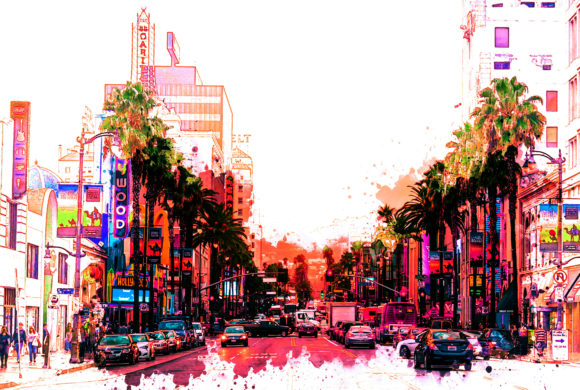
In the fast-paced world of digital content creation, standing out often means pushing beyond standard photography. Whether you are designing a website header, creating social media assets, or producing album art, the demand for unique, high-impact visuals is constant. This is where Techno Abstract comes into play. It is not just another filter; it is a specialized Photoshop Action designed to convert ordinary photographs into complex, futuristic abstract compositions with minimal effort. For creators who need professional-grade results without spending hours on manual layering and effect application, this tool offers a streamlined workflow that balances automation with creative control.
Understanding the Workflow Efficiency
The primary appeal of Techno Abstract lies in its ability to save an immense amount of work per photo. Traditional methods for creating abstract digital art involve multiple steps: duplicating layers, applying various blend modes, adjusting curves, and manually painting effects. This process can take anywhere from thirty minutes to several hours, depending on the complexity desired. With this action, the same result is achieved in just a couple of clicks. This efficiency is particularly valuable for freelancers and small business owners who bill by the project or have tight deadlines. By reducing the technical heavy lifting, you can focus more on the conceptual side of your design rather than getting bogged down in repetitive editing tasks.
It is important to note that this tool is designed specifically for Adobe Photoshop CS5 and requires the software to be installed in the English version. While this might seem like a restriction, it ensures stability and compatibility with the script’s commands. If you are using a different language version, you may encounter errors during execution. Therefore, before downloading or purchasing, verify your software settings. This specificity helps maintain the integrity of the action, ensuring that every layer and adjustment applies correctly without translation issues affecting the script’s logic.
Ideal Input Quality for Professional Results
To get the best possible outcome out of the Photoshop Action, the quality of your source material matters significantly. The algorithm behind Techno Abstract relies on detailed pixel information to generate its intricate patterns. Using low-resolution or heavily compressed images will result in muddy, unclear abstracts that lack the sharp, techno aesthetic the tool is known for. The recommendation is to use high-resolution images, ideally around 3000px by 3500px at 300 dpi.
Why does resolution matter so much? When an action applies multiple transformations, blurs, and distortions, it stretches and manipulates the original pixels. High-resolution inputs provide enough data for these manipulations to look crisp and intentional rather than pixelated or blurry. For photographers, this means starting with raw files or high-quality JPEGs from a DSLR or mirrorless camera. For digital artists, it means working at a canvas size that allows for detailed output. If you attempt to upscale a small image before running the action, you may introduce artifacts that degrade the final look. Starting with the right foundation ensures the final abstract piece retains its visual impact, whether viewed on a mobile screen or printed in large format.
The Advantage of Organized Layers
One of the most underrated features of Techno Abstract is its layer organization. Many automated actions produce a flattened image or a chaotic stack of unnamed layers, making further customization difficult. In contrast, this action keeps layers neatly organized and labeled. This structure allows you to dive into the file after the action has run and make precise adjustments.
For instance, you might want to tweak the color balance of a specific element, adjust the opacity of a texture overlay, or mask out a portion of the effect to reveal more of the original subject. Because the layers are grouped logically, you can identify exactly which component controls which part of the image. This flexibility is crucial for professional workflows where client revisions are common. Instead of re-running the entire action or starting from scratch, you can fine-tune the existing layers to meet specific feedback. This hybrid approach—automated generation followed by manual refinement—offers the best of both worlds: speed and precision.
Real-World Applications Across Industries
The versatility of Techno Abstract makes it suitable for a wide range of users and industries. Here is how different creators can leverage this tool in their daily work:
- Digital Marketers and Social Media Managers: Eye-catching visuals are essential for stopping the scroll on platforms like Instagram and LinkedIn. Techno Abstract can transform standard product photos or team headshots into vibrant, artistic backgrounds for promotional posts. This helps maintain brand consistency while adding a modern, tech-savvy edge to campaigns.
- Musicians and Event Promoters: Album covers and event flyers often require bold, abstract imagery that conveys energy and mood. Instead of hiring a graphic designer for every release, independent artists can use this action to create unique cover art from their own promotional photos. The "techno" aesthetic aligns perfectly with electronic music genres, but the abstract nature allows it to fit various artistic styles.
- Web Designers and UI Developers: Website headers and hero sections benefit from unique background textures that do not distract from the text. By applying Techno Abstract to relevant industry images, designers can create custom, lightweight backgrounds that enhance the site’s visual identity without relying on stock photography that everyone else uses.
- Educators and Content Creators: Bloggers and online course creators need engaging thumbnails and featured images. Abstract art can serve as a neutral yet interesting backdrop for text overlays, making titles pop without clashing with the content. It adds a layer of professionalism and creativity to educational materials.
What Is Included and What to Expect
When you acquire Techno Abstract, you receive a package designed to get you started immediately. The download includes the Action file (.ATN), which is the core script that performs the transformation. Additionally, you get Brushes (.ABR) that may be used in conjunction with the action or for manual touch-ups. A Help file in Notepad format provides installation instructions and basic troubleshooting tips, ensuring that even users new to Photoshop actions can set up the tool correctly.
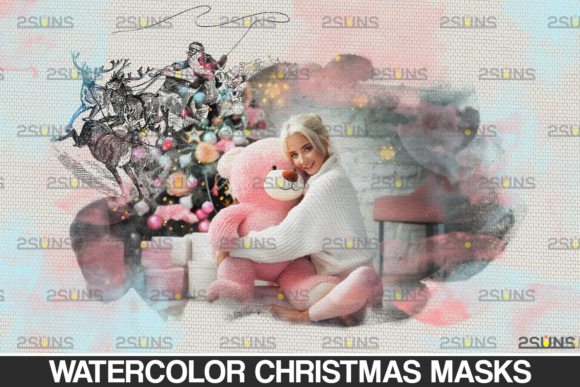
It is essential to manage expectations regarding what is not included. Preview images and Mockups are not part of the package. This means the visual examples you see in promotional materials are demonstrations of what the action can do, but they are not templates you can simply drop your image into. You must apply the action to your own photos. Understanding this distinction helps users approach the tool with the right mindset: it is a generator, not a pre-made template. The quality of the output depends entirely on the input image and your willingness to experiment with different photos.
Making the Right Choice for Your Creative Toolkit
Before integrating Techno Abstract into your workflow, consider your current needs and technical setup. If you are already comfortable with Photoshop CS5 and work primarily in English, the learning curve is minimal. The tool is ideal for those who value time efficiency and want to expand their visual style without learning complex new software. However, if you rely on newer versions of Photoshop or non-English interfaces, you may need to adjust your environment or look for alternative solutions.
Ultimately, Techno Abstract is about empowering creators to produce high-quality, distinctive art with less friction. It bridges the gap between technical skill and creative vision, allowing you to focus on storytelling and design strategy. By providing a reliable, organized, and efficient way to generate abstract effects, it becomes a valuable asset in any digital creator’s toolkit, helping you deliver polished, professional results consistently.