Foody Christmas Edition: Tasty Design Effects
The holiday season brings a unique pressure for creators, marketers, and small business owners. Everyone is looking for designs that feel warm, inviting, and distinctly festive. Standard snowflakes and generic red ribbons often fail to capture the cozy atmosphere people crave during December. This is where the Foody Christmas Edition steps in as a transformative tool for your creative workflow. It allows you to create designs that literally look good enough to eat, tapping into the powerful sensory appeal of holiday baking.
This collection is not just a set of static images; it is a comprehensive toolkit designed to bring realism and texture to your digital projects. By focusing on high-quality food lettering effects, it enables you to craft visuals that stand out in a crowded social media feed or on a printed flyer. Whether you are a seasoned graphic designer or a beginner exploring Photoshop for the first time, this kit simplifies the process of creating professional-grade holiday assets.
Why Food-Themed Designs Resonate During the Holidays
There is a psychological reason why food imagery dominates Christmas marketing. The holidays are deeply connected to comfort, tradition, and sharing meals. When a viewer sees a realistic image of a gingerbread cookie or a steaming pie, it triggers an emotional response associated with warmth and home. Using the Foody Christmas Edition allows you to leverage this connection instantly.
Instead of relying on flat colors, you can add depth and texture that mimics real ingredients. Imagine designing a promotional post for a local bakery. With standard tools, you might place a photo of a cake next to some text. With this kit, you can integrate the text into the scene using flour dusting effects, glaze overlays, and pastry textures. The result is a cohesive image that tells a story rather than just displaying information. This level of detail builds trust and appeal, which is crucial for entrepreneurs and bloggers trying to engage their audience during the busy end-of-year period.
Understanding the Toolkit Components
One of the strongest aspects of this product is its versatility. It is not limited to just one type of effect. The kit includes a wide array of layer styles, brushes, and actions that work together to create complex scenes. For instance, the inclusion of five different drop shadow layer styles ensures that your text or graphics sit naturally within the composition, avoiding that "floating" look that often plagues amateur designs.
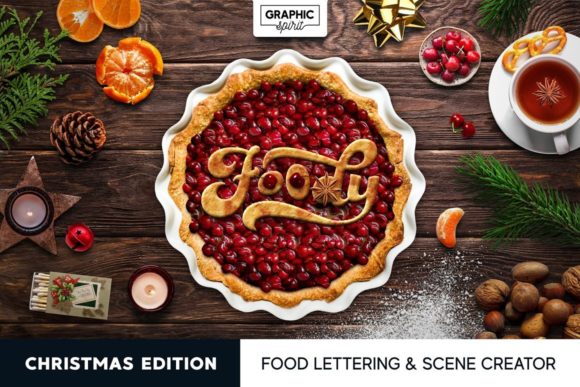
The specific food effects are where the magic happens. You get specialized layer styles for flour, glaze, cherry jam, and even blueberry filling. These are not generic filters; they are crafted to mimic the physical properties of these ingredients. The flour layer style, for example, adds a soft, powdery texture that can make any element look like it has been freshly dusted in a kitchen. Similarly, the glaze and jam styles add glossy, reflective highlights that suggest freshness and sweetness.
Beyond layer styles, the kit provides practical brushes and actions. The two flour brushes and candy sprinkle brushes allow for manual customization, giving you control over where and how much texture is applied. The actions, such as the Blueberry Pie Actions and Ripple Actions, automate complex processes. This means you can achieve a sophisticated look with just a few clicks, saving hours of manual editing time. For beginners, this lowers the barrier to entry significantly, allowing them to produce high-quality work without needing advanced technical skills.
Practical Applications for Creators and Businesses
The utility of the Foody Christmas Edition extends far beyond simple greeting cards. Because all effects work at a resolution of 300 dpi, they are perfectly suited for print media. This is a critical feature for small business owners who need to produce physical marketing materials. You can create eye-catching flyers for holiday sales, professional postcards for client appreciation, or large banners for seasonal events. The high resolution ensures that every crumb of oat cookie and every drip of icing remains sharp and clear when printed.
Digital creators also benefit immensely from this toolkit. Bloggers writing about holiday recipes can use the pre-made scenes and PNG extras to create unique header images that match their content. Social media managers can design engaging posts for Instagram or Facebook that stop users from scrolling. The included JPG backgrounds, sized at 6000x4000 pixels, provide a perfect canvas for these compositions. You can easily supplement your Christmas design with spruce branches, candles, and cookies from the 76 PNG extras included in the package.
Educators and hobbyists will find the kit equally valuable. Teachers creating materials for holiday-themed lessons can use the fun, food-based graphics to make learning more engaging. Hobbyists interested in digital art can experiment with the different textures to improve their understanding of light, shadow, and material rendering in Photoshop. The variety of elements, from tablecloth textures to gingerbread styles, offers a sandbox for creative exploration.
Getting Started with Minimal Effort
A common concern for many users is the learning curve associated with new design tools. However, working with this kit is designed to be intuitive. The inclusion of five PSD pre-made scenes serves as an excellent starting point. These templates, featuring blueberry pie, cherry pie, and flour themes, show you exactly how the layers interact. By deconstructing these files, you can learn best practices for organizing your own projects.
To begin, you might start by typing out a simple holiday message. Apply the Gingerbread Layer Style to give the text a baked, textured appearance. Then, use the Flour Brush to add a light dusting around the letters for a whimsical touch. If you want to add more depth, apply the Shadow Volume Layer Style. Finally, drag in some of the PNG extras, like a spruce branch or a candle, to frame your composition. The entire process can take less than ten minutes, yet the result looks like it took hours to craft.
It is important to consider your project goals before diving in. If you are aiming for a minimalist aesthetic, you might rely more on the subtle flour and shadow effects. For a bold, vibrant look, the cherry jam and candy sprinkle brushes are ideal. Understanding the mood you want to convey will help you select the right combination of tools from the kit. Remember, the goal is to enhance your message, not overwhelm it. The realistic nature of these effects means they can carry a design on their own, so often, less is more.
In conclusion, the Foody Christmas Edition offers a delightful and efficient way to elevate your holiday designs. By combining realistic textures, easy-to-use actions, and high-resolution assets, it empowers users of all skill levels to create memorable visual content. Whether you are printing flyers for your shop or designing digital cards for friends, this toolkit provides the ingredients you need to succeed.