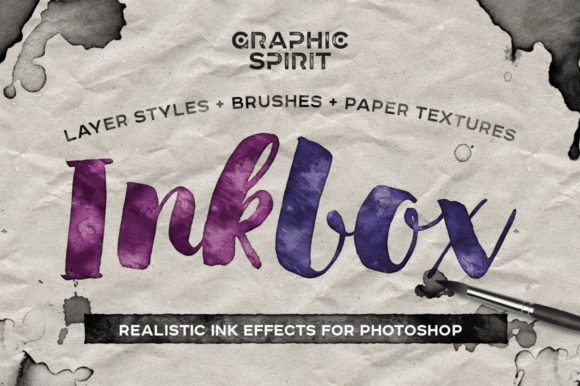
Inkbox Realistic Ink Effects Guide
Digital design often struggles to capture the organic imperfection of physical media. When you work strictly with vector shapes and clean digital brushes, your projects can feel sterile or overly manufactured. This is where Inkbox Realistic Ink Effects becomes an essential tool for designers who want to bridge the gap between the screen and the page. By offering instant ink effects in Photoshop, this kit allows you to apply authentic, textured looks to text or any layer with minimal effort. It is particularly valuable for design projects aiming for a handmade, artisanal, or vintage aesthetic.
The core value of this resource lies in its versatility and ease of use. Whether you are a seasoned graphic designer looking to speed up your workflow or a hobbyist experimenting with digital art for the first time, the ability to instantly generate realistic ink bleeds, stains, and textures can transform a flat composition into something tactile and engaging. The kit includes multiple color styles—black, blue, purple, red, and green—along with a variety of paper textures such as kraft, cardboard, corrugated, and crumpled options. Additionally, it comes with an ABR file containing twenty unique ink blot brushes, providing a comprehensive suite for creative experimentation.
Why Authentic Texture Matters in Digital Design
In an era where AI-generated images and stock photography dominate the visual landscape, audiences are increasingly drawn to content that feels human-made. Imperfections, such as ink spreading on rough paper or slight variations in color saturation, signal authenticity. For marketers and small business owners, using Inkbox Realistic Ink Effects can help differentiate a brand from competitors who rely on generic, polished corporate aesthetics. It adds a layer of warmth and approachability that resonates with consumers seeking genuine connections.
For educators and publishers, these effects can enhance learning materials by making them visually interesting without being distracting. A worksheet or textbook header that looks like it was stamped or hand-written can increase student engagement. Similarly, bloggers and content creators can use these textures to create featured images that stand out in social media feeds, where users scroll quickly past standard digital graphics.
Tailoring Use Cases to Your Skill Level
Different users will approach this toolkit with varying priorities. Understanding how your specific role influences your needs can help you maximize the value of the product.
For Beginners and Hobbyists
If you are new to Photoshop, the learning curve can be steep. Many tutorials focus on complex layer masking and blending modes, which can be overwhelming. Inkbox Realistic Ink Effects simplifies this process. The "instant" nature of the effects means you do not need to spend hours learning how to simulate ink dispersion manually. You can drag and drop a texture, apply a blend mode, and achieve a professional result immediately. This immediate feedback loop is crucial for beginners, as it builds confidence and encourages further exploration of digital design principles. The included user guide ensures that even those with limited technical knowledge can navigate the files effectively.
For Professionals and Freelancers
Experienced designers often face tight deadlines. While they possess the skills to create custom ink effects from scratch, doing so for every project is time-consuming and inefficient. For freelancers and agency professionals, this kit serves as a high-quality asset library that accelerates production. The twenty ink blot brushes alone can save significant time when adding subtle details to logos, packaging designs, or editorial layouts. The variety of paper textures—such as corrugated and crumpled kraft—allows professionals to mock up designs realistically without needing to photograph physical samples. This capability is particularly useful for client presentations, where showing a design in context helps secure approval.
For Entrepreneurs and Small Business Owners
Small business owners often wear many hats, including marketing and design. They may not have the budget to hire a professional designer for every social media post or flyer. Inkbox Realistic Ink Effects empowers them to create high-quality, branded content in-house. The handmade style aligns well with businesses that sell artisanal products, organic goods, or vintage items. By using the red or green ink styles, a coffee shop owner could create eye-catching menu boards, while a boutique clothing brand might use the purple ink effects for limited-edition sale announcements. The cost-effectiveness of purchasing a single kit versus subscribing to multiple stock photo services makes it a practical investment for limited budgets.
Exploring the Creative Possibilities
The flexibility of this kit extends beyond simple text overlays. Because the effects can be applied to any layer, you can integrate them into complex compositions. Consider a wedding invitation designer who wants to evoke a rustic charm. By combining the black ink style with the kraft paper texture, they can create a save-the-date card that feels intimate and personal. Alternatively, a music promoter designing a poster for an indie rock band might use the blue ink style with crumpled paper textures to convey a raw, underground vibe.
The inclusion of multiple colors is a significant advantage. While black ink is traditional, using blue, purple, red, or green allows for greater creative expression. These colors can be matched to brand guidelines or used to create mood-specific designs. For instance, green ink might be ideal for environmental campaigns, while red could be used for urgent alerts or passionate artistic statements. The ability to switch between these styles quickly enables rapid prototyping, allowing creators to test different visual directions before settling on a final design.
Evaluating Quality and Long-Term Usefulness
When considering any digital asset, it is important to evaluate its long-term usefulness. Unlike trend-specific fonts or graphics that may become outdated quickly, realistic ink effects are timeless. The desire for tactile, organic visuals is a enduring principle in design history. Therefore, investing in a high-quality kit like Inkbox Realistic Ink Effects offers lasting value. The ABR brush file ensures compatibility with future versions of Photoshop, and the texture files can be reused across countless projects.
Moreover, the quality of the textures matters. Low-resolution images can pixelate when scaled, ruining the illusion of realism. This kit provides high-resolution assets that maintain clarity even in large-format prints. For publishers and educators who may need to print materials at various sizes, this reliability is crucial. The attention to detail in the ink blots—capturing the natural irregularities of fluid dynamics—adds a level of sophistication that cheaper alternatives often lack.
Making the Right Choice for Your Project
To determine if this kit matches your goals, consider the tone of your current projects. If you are working on corporate reports, tech startup branding, or minimalist web design, these effects may not be appropriate. However, if your work involves storytelling, heritage brands, artistic expressions, or anything that benefits from a human touch, this toolkit is highly relevant. It is also worth considering your workflow preferences. If you enjoy the process of building textures from scratch, you might prefer creating your own. But if you prioritize efficiency and consistent quality, having a pre-made library is invaluable.
Ultimately, Inkbox Realistic Ink Effects is more than just a collection of brushes and textures; it is a tool for enhancing emotional resonance in design. By providing easy access to realistic, handmade aesthetics, it empowers creators of all levels to produce work that feels authentic and engaging. Whether you are designing a logo, a social media graphic, or a printed publication, integrating these elements can elevate your visual communication and connect more deeply with your audience.