Water Effect Photoshop Action: A Practical Guide for Digital Artists
In the realm of digital photo manipulation, achieving realistic environmental effects often requires advanced technical skills and hours of meticulous editing. For photographers and graphic designers seeking efficiency without sacrificing quality, specialized tools like a Water Effect Photoshop Action offer a compelling solution. This automated workflow is designed to transform standard photographs into images featuring convincing water reflections, ripples, and distortions. By understanding how this tool functions, its compatibility requirements, and its ideal use cases, creators can make informed decisions about integrating it into their post-production pipeline.
Understanding the Technology Behind the Action
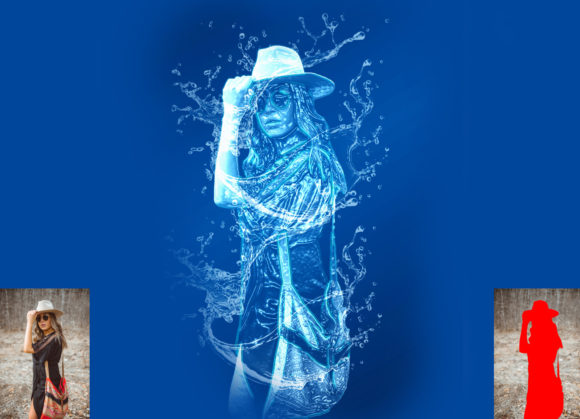
A Photoshop Action is essentially a recorded sequence of commands—such as menu selections, filter applications, and layer adjustments—that can be played back with a single click. The Water Effect Photoshop Action leverages this functionality to apply complex algorithms that simulate the optical properties of water. Rather than manually creating displacement maps or adjusting opacity levels for individual layers, the action automates these processes. The result is a non-destructive effect, meaning the original image data remains intact, allowing for further customization and refinement after the initial application.
The core mechanism typically involves analyzing the luminance and contrast of the source image to generate realistic refractions. Users are often required to prepare their file by creating a specific layer, commonly named "paint" in lowercase, where they define the areas intended to exhibit the water effect. This step provides the action with the necessary spatial data to apply distortions accurately. Once the action is executed, it generates a series of organized layers, including adjustment layers and smart objects, which can be tweaked to suit the specific lighting and mood of the photograph.
Compatibility and Technical Requirements
Before adopting any digital asset, verifying software compatibility is crucial to ensure a smooth workflow. This particular pack has been rigorously tested on English versions of Adobe Photoshop, ranging from CS5.5 to the more recent CC2020. Supported versions include CS6, CC2014, CC2015, CC2015.5, CC2016, CC2017, CC2018, CC2019, and CC2020. It is important to note that the action relies on features present in these specific iterations; therefore, users operating on significantly older or newer non-English interfaces may encounter installation or execution errors.
For optimal results, the recommended image dimensions are 2000x3000 pixels or 3000x2000 pixels at 72 DPI. While the action can technically process other resolutions, adhering to these specifications ensures that the texture details and distortion effects render correctly without pixelation or excessive processing time. The package typically includes the primary ATN (Action) file, custom brushes for defining the effect area, a PDF help file, and a user guide. These resources are essential for beginners who may be unfamiliar with the precise naming conventions and layer management required for the action to function properly.
Benefits and Practical Advantages
The primary advantage of using a Water Effect Photoshop Action is time efficiency. Manually creating realistic water effects involves multiple steps, including duplicating layers, applying wave filters, masking, and adjusting color balance to match the environment. An action condenses this workflow into seconds, allowing designers to iterate quickly. This speed is particularly beneficial for professionals handling high volumes of images, such as those working in advertising, real estate visualization, or social media content creation.
Furthermore, the non-destructive nature of the effect supports creative flexibility. Since the action generates organized layers, users can easily modify the intensity of the ripple, adjust the color tone of the water, or mask out specific areas where the effect appears unnatural. This level of control ensures that the final output does not look like a generic preset but rather a tailored enhancement that complements the original composition. The inclusion of custom brushes also aids in precision, allowing users to paint exactly where the water should appear, whether it is a puddle on a street, a reflection in a window, or a surreal underwater transformation.
Considerations and Limitations
While automated tools offer convenience, they are not without limitations. The quality of the final result is heavily dependent on the source image. Photos with clear subjects, distinct lighting, and appropriate perspective yield the best outcomes. Images that are overly dark, blurry, or lack defined edges may produce unrealistic or muddy results when the action is applied. Additionally, because the action operates based on predefined parameters, it may not account for unique lighting conditions or complex geometric perspectives that require manual intervention.
Another consideration is the learning curve associated with the setup process. Although the action itself is easy to use, the prerequisite step of creating and naming the "paint" layer must be followed precisely. Failure to adhere to these instructions—such as using uppercase letters or forgetting to close the layer visibility—will result in errors. Users must be comfortable with basic Photoshop layer management to troubleshoot these issues effectively. Moreover, while the action supports a wide range of Photoshop versions, it is restricted to English language installations, which may pose a barrier for international users relying on localized software interfaces.
Ideal Use Cases and Alternatives
This tool is a strong fit for scenarios where speed and consistency are prioritized. For example, digital artists creating fantasy composites can quickly add atmospheric water elements to landscapes. Marketing professionals might use it to enhance product photography by adding reflective surfaces that suggest purity or freshness. It is also valuable for educators and students learning about photo manipulation, as the organized layer structure provides insight into how professional effects are constructed.
However, there are situations where alternatives may be worth considering. For projects requiring hyper-realistic fluid dynamics or interactive water simulations, dedicated 3D software or specialized plugins like Flaming Pear’s Flood might offer greater control. Similarly, if a designer needs to create a unique, one-off effect that deviates significantly from standard water patterns, manual editing using displacement maps and liquify tools may provide the necessary artistic freedom. In cases where the budget allows for extensive retouching, hiring a specialist to manually craft the effect ensures the highest level of customization and realism.
Making the Right Decision
Choosing whether to incorporate a Water Effect Photoshop Action into your workflow depends on your specific goals and technical comfort level. If you frequently need to add water effects to multiple images and value a streamlined, repeatable process, this tool offers significant value. Its ability to deliver high-quality, customizable results with minimal effort makes it an efficient addition to a designer’s toolkit. However, if your projects demand absolute precision in complex lighting scenarios or if you prefer complete manual control over every pixel, investing time in mastering manual techniques or exploring advanced plugins may be more appropriate.
Ultimately, the decision hinges on balancing efficiency with creative control. By understanding the capabilities and constraints of the action, users can leverage it effectively to enhance their visual storytelling while maintaining professional standards. Whether used for quick enhancements or as a foundation for further manual refinement, this tool serves as a practical resource for modern digital imaging.