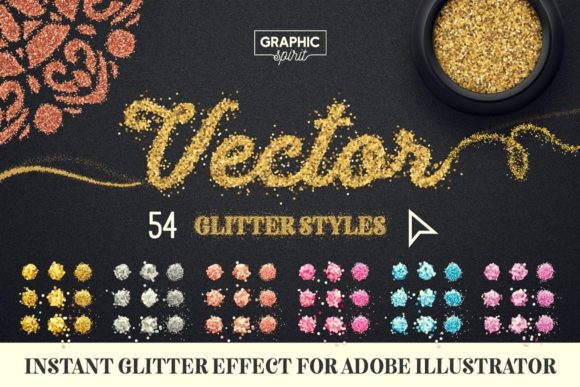
Vector Glitter for Adobe Illustrator: Elevate Your Designs with Instant Sparkle
In the competitive world of digital design and print media, capturing attention is half the battle. Whether you are crafting luxury packaging, designing eye-catching social media graphics, or creating large-format event banners, texture plays a pivotal role in conveying quality and excitement. However, achieving a realistic glitter effect has traditionally been a time-consuming process involving complex layering, noise filters, and heavy raster images that lose quality when scaled. This is where Vector Glitter for Adobe Illustrator transforms the workflow, offering a seamless, scalable, and professional solution for designers who demand both efficiency and aesthetic excellence.
The Challenge of Digital Sparkle
For many graphic designers, adding shimmer and shine to vector artwork presents specific technical hurdles. Standard raster-based glitter textures often pixelate when enlarged, making them unsuitable for large-format printing such as billboards or trade show displays. Furthermore, managing multiple layers of effects can bloat file sizes and slow down Adobe Illustrator, leading to frustrating lag times during the creative process. Designers often find themselves stuck between choosing a low-resolution image that prints poorly or spending hours manually constructing a vector pattern that lacks organic randomness.
The need for a tool that combines the scalability of vectors with the visual richness of glitter is evident. Professionals require a resource that integrates smoothly into existing workflows, allowing for quick adjustments without compromising on visual fidelity. This is precisely the gap that Vector Glitter for Adobe Illustrator fills, providing a robust library of assets that are ready to use instantly.
A Comprehensive Suite for Every Design Need
This collection is not just a single brush or texture; it is a comprehensive toolkit designed to cover a wide spectrum of design scenarios. Upon acquisition, users receive a set of 52 glitter styles distributed across 6 distinct colors. This variety ensures that whether you are working on a warm, golden luxury brand identity or a cool, modern tech flyer, there is a perfect match available. The inclusion of 6 sparkle brushes adds an extra layer of dynamism, allowing designers to paint light reflections and highlights with precision.
The versatility extends to the background options as well. With 4 background styles included—ranging from dark and light variants to vignette options—designers can immediately visualize how their glitter elements will pop against different contrasts. This holistic approach means that the asset pack serves as a complete solution rather than a fragmented add-on.
Diverse Styles for Unique Aesthetics
One of the standout features of this collection is the diversity of glitter shapes. Not all sparkle is created equal, and the nuance lies in the geometry of the particles. The pack includes three primary types of glitter for each color variant:
- Square Glitter: Offers a classic, structured look that reflects light in a uniform, grid-like pattern. Ideal for geometric designs and modern layouts.
- Hexagon Glitter: Provides a more organic, honeycomb-inspired texture that feels natural and sophisticated. Perfect for beauty and lifestyle branding.
- Dust Glitter: Creates a fine, mist-like shimmer that adds subtle depth without overwhelming the design. Excellent for backgrounds and soft accents.
These styles are available in six carefully curated colors: Gold, Silver, Copper, Blue, Rose, and Purple. Each color is engineered to maintain its vibrancy and metallic sheen regardless of the background it is placed upon. For instance, the Gold Square Glitter can instantly elevate a black business card design, while the Blue Hexagon Glitter might be the perfect touch for a winter-themed invitation suite.
Instant Application and Workflow Efficiency
Time is a critical resource for any designer. The primary advantage of using Vector Glitter for Adobe Illustrator is the speed of implementation. The effect is applied instantly with just one click. There is no need to navigate through complex effect menus or adjust endless slider bars. Users can simply select the desired glitter style, choose a color, and apply it to their objects.
Adjustability is key to maintaining creative control. The vector nature of these assets means that users can easily adjust the size of the glitter to suit their specific composition. Whether you need dense, coarse glitter for a bold statement or fine, sparse dust for a subtle hint of luxury, the controls are intuitive and responsive. Additionally, the ability to copy objects into another document ensures that these assets can be integrated into existing projects without disrupting the file structure or requiring extensive setup.
Scalability: From Web to Large Format Printing
Perhaps the most significant technical benefit of this toolkit is its reliance on vector formats. Unlike raster images, which are composed of pixels and have a fixed resolution, vector graphics are based on mathematical paths. This means they can be scaled to any size without losing quality.
This characteristic makes Vector Glitter for Adobe Illustrator incredibly versatile. A design created for a small Instagram post can be effortlessly scaled up for a massive outdoor billboard without any risk of pixelation or blurriness. This scalability is crucial for agencies and freelancers who often need to repurpose assets across multiple platforms and mediums. Whether the final output is digital web design, high-quality brochure printing, or large-format signage, the glitter effects remain crisp, clean, and professional.
Practical Applications Across Industries
The utility of this glitter collection spans various industries and design disciplines. Here are a few practical examples of how professionals can leverage these assets:
- Luxury Branding: Use Gold or Rose Hexagon Glitter on packaging designs for cosmetics, jewelry, or premium food products to convey exclusivity and high value.
- Event Marketing: Apply Silver or Blue Dust Glitter to concert posters, festival banners, and party invitations to create a sense of energy and celebration.
- Holiday Campaigns: Utilize the full spectrum of colors and sparkle brushes to create festive graphics for Christmas, New Year’s Eve, and other seasonal promotions.
- Fashion and Textiles: Designers can mock up glittery fabric patterns or accessory details with precision, knowing that the vector files will hold up during the production proofing stage.
Tailoring the Approach for Different Users
Different designers will approach Vector Glitter for Adobe Illustrator in ways that suit their specific workflows. Beginners may appreciate the pre-made nature of the styles, allowing them to achieve professional results without advanced technical knowledge. The included User Guide.pdf serves as a helpful resource for getting started quickly, ensuring that even those new to vector effects can navigate the tools with confidence.
Experienced professionals, on the other hand, may value the modularity of the pack. They might isolate specific elements, such as the Copper Square Glitter, to combine with other custom vectors, or use the Sparkle Brushes to add manual highlights to illustrations. The ability to edit and manipulate individual vector points allows for a level of customization that raster textures simply cannot offer.
Making the Most of Your Assets
To maximize the impact of these glitter styles, consider the context of your design. Glitter works best when used strategically rather than excessively. Use the Dark Background and Dark Background Vignette options to test contrast and ensure your glitter pops. When working with lighter themes, the Light Background and Light Background Vignette styles provide a clean canvas that lets the Silver or Rose glitters shine without appearing muddy.
Furthermore, experiment with layering. Combining a base of Dust Glitter with scattered Square or Hexagon particles can create a sense of depth and realism. The 6 Sparkle Brushes can then be used to add singular, bright highlights that mimic the reflection of light sources, adding a three-dimensional quality to the flat vector art.
In conclusion, Vector Glitter for Adobe Illustrator is more than just a decorative add-on; it is a practical, efficient, and high-quality tool that addresses common design challenges. By offering instant application, infinite scalability, and a diverse range of styles and colors, it empowers designers to create stunning, sparkling visuals for any medium. Whether you are enhancing a small digital icon or designing a massive print campaign, this collection provides the reliability and flexibility needed to bring your creative vision to life with brilliance and ease.