Master the Patchwork Effect in Photoshop
Some people consider patchwork as something not too serious, merely scraps of fabric from which little old ladies sew colorful quilts. But if you are inspired by the cozy style of patchwork with echoes of freedom boho chic, yet Photoshop is closer to you than the sewing machine, then this Creative Toolkit will definitely appeal to your design sensibilities. The digital realm offers a unique opportunity to blend traditional aesthetics with modern efficiency, allowing creators to produce intricate, textured designs without the physical constraints of thread and needle.
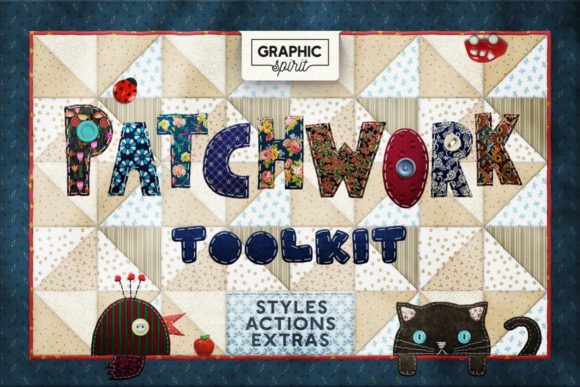
The PATCHWORK Effect Photoshop TOOLKIT serves as a comprehensive bridge between tactile craft and digital artistry. It is designed for those who appreciate the warmth and nostalgia of handmade items but require the speed, scalability, and precision of graphic design software. Whether you are creating branding materials, social media content, or personal art projects, this toolkit provides the essential elements to replicate the look of stitched fabric, layered textiles, and geometric patterns instantly.
Why Digital Patchwork Matters for Modern Designers
In an era where minimalism has dominated visual trends for years, there is a growing appetite for textures that feel authentic and grounded. Consumers and audiences are increasingly drawn to designs that evoke emotion and comfort. This is where the value of the PATCHWORK Effect Photoshop TOOLKIT becomes evident. It allows designers to inject personality and warmth into their work without starting from scratch.
For entrepreneurs and small business owners, particularly those in lifestyle, fashion, or home decor sectors, maintaining a consistent brand aesthetic is crucial. A brand that utilizes soft, stitched textures can communicate values of care, craftsmanship, and sustainability. Using pre-made actions and styles ensures that this look remains consistent across various touchpoints, from packaging to website banners. Instead of spending hours manually drawing stitches or arranging geometric shapes, you can apply these effects in seconds, freeing up time to focus on strategy and creativity.
Exploring the Components of the Toolkit
Understanding what is included in this package helps clarify how versatile it can be for different projects. The toolkit is not just a single filter; it is a suite of tools designed to work together harmoniously. Here is a breakdown of the key features and how they contribute to your workflow:
- Layer Styles: The inclusion of 60 dark tone, 60 medium tone, and 60 light tone patchwork layer styles means you have immediate access to a wide spectrum of moods. Dark tones can create a sophisticated, rugged look suitable for men’s fashion or industrial themes, while light tones offer a airy, delicate feel perfect for spring collections or baby products.
- Geometric Actions: The patchwork actions cover a variety of shapes, including Triangles, Squares, Cubes (both small and big), Crystals, Boxes, and Fabric Waves. These actions automate the complex task of arranging shapes into cohesive patterns. For instance, the "Fabric Waves" action can simulate the flow of draped textile, adding depth and movement to static images.
- Realistic Stitching: With 24 realistic stitch brushes and specific stitch actions like "Stitch around" and "Stitch inside," you can add the finishing touches that make a digital design feel tangible. These brushes mimic the imperfections of real thread, preventing the design from looking too sterile or computer-generated.
- Ready-to-Use Assets: The 42 PNG buttons and 2 PNG alphabets provide quick elements for web design and typography. You can overlay these on photos or use them as standalone graphics for calls-to-action.
Practical Applications Across Industries
The versatility of the PATCHWORK Effect Photoshop TOOLKIT extends far beyond simple photo editing. Its high-resolution capability makes it suitable for both print and digital media. Since the effects work at 300 dpi, they are print-ready for professional outputs. If you need a design for a screen or web, such as a banner for a social network or a post, you simply save the result in the required resolution. After all, more is better than less when it comes to asset flexibility.
Print Media and Packaging
For product packaging, texture is a powerful selling point. Imagine a coffee bag or a candle box featuring a subtle patchwork background. It suggests a handmade, artisanal quality that resonates with customers seeking authentic experiences. Designers can use the square or cube actions to create a structured grid behind product text, then apply a light tone layer style to keep the background unobtrusive yet interesting. The high DPI ensures that when printed, the stitches and fabric textures remain crisp and detailed, avoiding the pixelation that often plagues lower-quality assets.
Digital Marketing and Social Media
In the fast-paced world of social media, standing out requires eye-catching visuals. Bloggers and marketers can use the toolkit to create cohesive Instagram feeds. By applying a consistent patchwork style to quote cards or promotional posts, you establish a recognizable visual identity. The PNG buttons and alphabets are particularly useful here, allowing for quick creation of engaging stories or highlights covers. The ability to switch between dark, medium, and light tones allows you to adapt your content to different times of day or seasonal campaigns without losing brand consistency.
Educational and Personal Projects
Educators and hobbyists can also benefit from this toolkit. Teachers creating materials for history or art classes might use the patchwork effects to illustrate traditional crafts in a modern context. Hobbyists making digital scrapbooks or greeting cards can use the stitch brushes and fabric wave actions to add a personal, heartfelt touch to their creations. The PSD Quick Start file is invaluable for beginners, providing a template that demonstrates how the layers interact, reducing the learning curve significantly.
Important Considerations for Best Results
While the PATCHWORK Effect Photoshop TOOLKIT is designed for ease of use, achieving professional results requires attention to detail. Here are a few tips to keep in mind:
- Resolution Management: Always start with a high-resolution canvas if you intend to print. Working at 72 dpi and then upsizing to 300 dpi will result in loss of quality. It is much easier to downscale a 300 dpi image for web use than to upscale a low-res image for print.
- Color Harmony: With 180 different layer styles available, it can be tempting to use many at once. However, restraint is key. Choose a palette that complements your primary image or brand colors. Use the dark, medium, and light categories to create contrast and hierarchy, rather than cluttering the design.
- Layer Organization: Actions in Photoshop can create multiple layers. Keep your workspace organized by naming layers and using groups. This makes it easier to tweak specific elements, such as adjusting the opacity of a stitch layer to make it look more worn or subtle.
- Contextual Appropriateness: Not every project benefits from a patchwork aesthetic. Consider your audience and message. While boho chic and cozy styles are popular, they may not suit corporate finance reports or high-tech product launches. Use the toolkit where warmth and tradition align with your communication goals.
Ultimately, this toolkit is about empowering creativity. It removes the technical barriers to creating complex textile effects, allowing you to focus on the story you want to tell. Whether you are a seasoned designer looking to speed up your workflow or a beginner eager to explore new styles, the PATCHWORK Effect Photoshop TOOLKIT offers a robust set of resources to elevate your digital designs. By blending the charm of traditional craft with the power of modern software, you can create visuals that are not only visually striking but also emotionally resonant.